Show only what is still waiting.
Inbox on the machine. Awaiting + 24h is the default. Awaiting only is the work still waiting for a person.
Awaiting plus the last day
Open Accounts server and press inbox. The menu defaults to awaiting + 24h. That is waiting cards, plus anything decided in the last day. The head says 1, which is the waiting count. The group line says 1 awaiting · 3 shown, with reject all 1 and discuss. Three cards, newest first. Measure /var/log already ran and reported a problem. Vacuum the system journal already failed because allow_shell is off. List the largest folders on / is still waiting, with reject and no approve · run. Changing the menu does not reject anything.
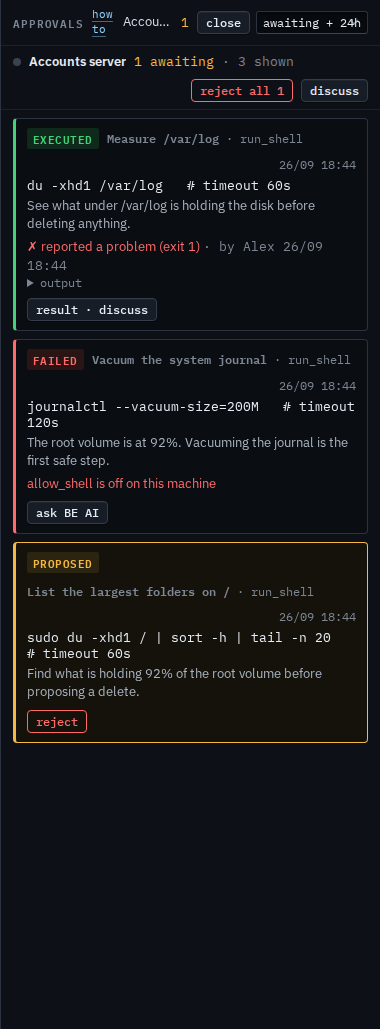
Keep only what is waiting
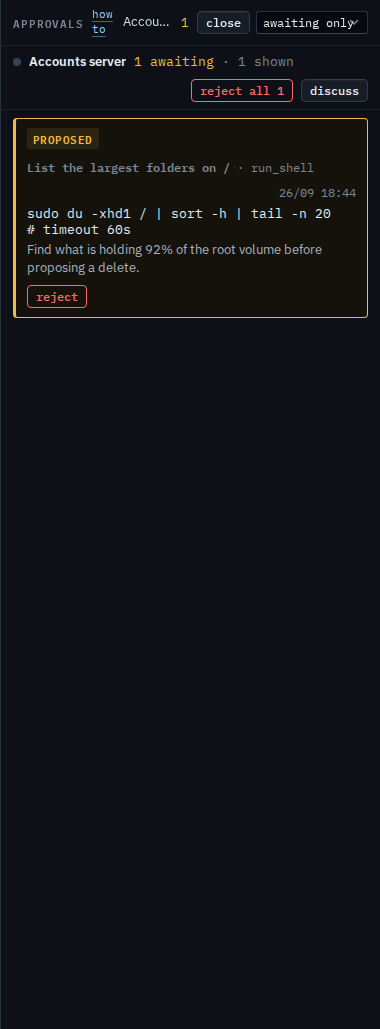
Set the menu to awaiting only. The failed journal vacuum and the executed disk measurement drop out. List the largest folders on / stays, with reject and no approve · run. The group line says 1 awaiting · 1 shown. Reject all 1 and discuss stay. The head still says 1. Everything brings the decided cards back, including older ones outside the last day. Set the menu back to awaiting + 24h to see today's three cards again.
Opening the rail is Read the inbox on your machine. The same queue for every computer you were given is A proposal you cannot run. Confirming a reject of every waiting copy is Reject every waiting proposal on your machines. What your provider sees, including approve, is Show only waiting approvals.