Show only your machines that are online.
The tick sits next to Needs attention. The number beside it is how many of your machines are up.
Start with the tick clear
Open Fleet. Online is clear, and the count beside it is 0. The heading is 0 / 3. Needs attention is open: Accounts server, whose disk is at 92%, and files01, which is offline. The other headings start closed. Reception PC is in the closed site › Melbourne group. It is expected to shut down, so being offline is not a reason on its own, and it is still in the list while this tick is clear. Lab host, Branch router, and Spare laptop are not in this list. There is no + machine. Discuss everyone is on the header because this login has BE AI. This shot does not press it.
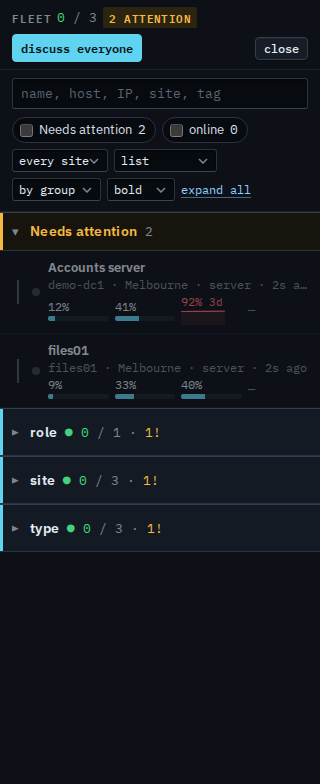
Tick online
Tick online. The list keeps a machine only when it is up. None of these three have a live tunnel, so the list says no agents. The heading stays 0 / 3, and the attention chip still says 2, because those counts are the machines you were given, not the filtered rows. On a live day the green dots remain and the rest drop out, including a machine that needs a look if it is off. Clear the tick to put Accounts server, files01, and Reception PC back. The choice lasts for this visit to the console. The tick does not restart a machine.
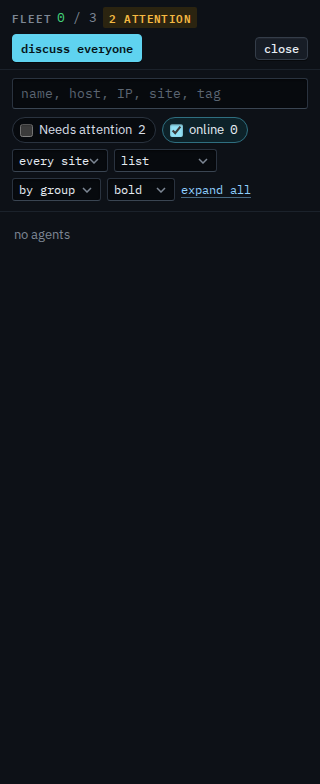
The list before the tick is See the computers you were given. Machines that need a look, including ones that are off, are Show only your machines that need attention. One list, without sites, is Show your machines as one list. What your provider sees, including machines outside your groups, is Show only machines that are online.