Give a customer their own install link.
A sub-company can have its own install link. It is off until you tick it. Machines stay enrolled in your company and join one of that customer's groups.
Tick own install link
Open My company › sub-companies and press new sub-company. Name it and tick the group, the same way you let them manage their computers. Then tick Own install link. New machines join the group in the menu — here, site, which also covers Melbourne. The machine stays in Example Co. It is not a second company.
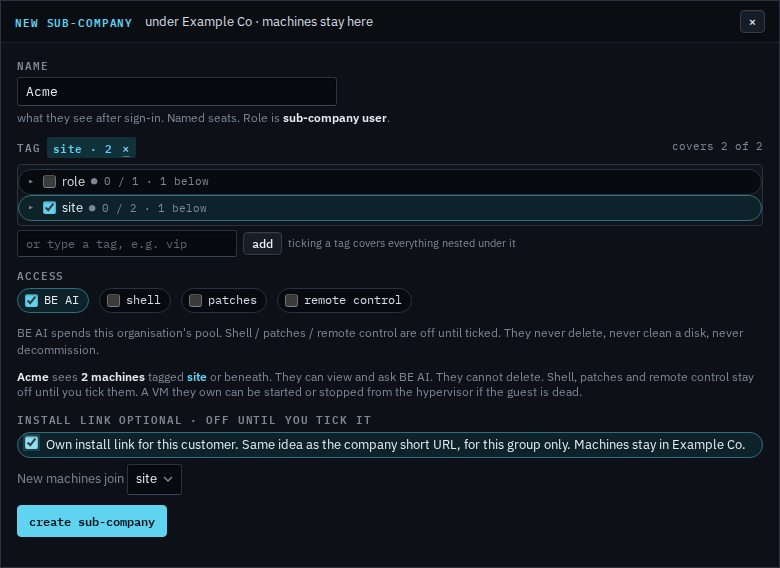
Copy the URL and send it to them
Press create sub-company. The manage dialog shows the URL to share. A machine installed from it is tagged site and appears under Acme. Run it the same way as the company install line. Rotate link asks you to confirm first. The old URL stops. Machines already installed keep reporting, because the enrollment token stays. Turning the link off later stops new installs the same way.
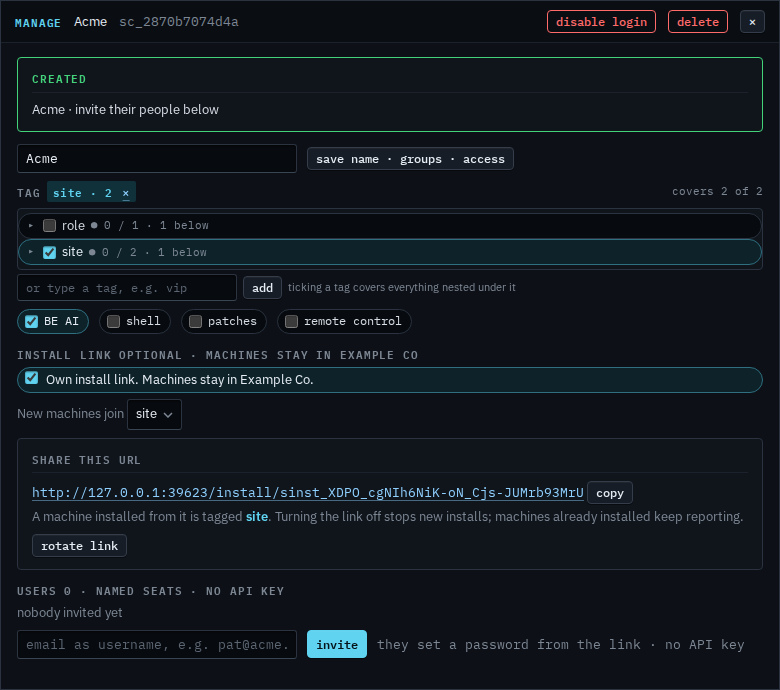
The list shows the link is on
Close the dialog. The sub-companies list marks Acme with install link. Open manage later to copy the URL again, change which group new machines join, or turn the link off. Their people see the same URL on the strip under the brand. They cannot rotate it.

Choosing a smaller group for machines they install is Choose the group a customer's new machines join. Turning the link off stops new installs — Turn off a customer's install link. Replacing the URL is Rotate a customer's install link. It does not disconnect machines already enrolled. Deleting the sub-company removes the link; those machines need the company install link, with Apply, before they connect again. The company install link does not tag machines into this group. Their people see this URL on the strip after they sign in, and they cannot rotate it. They still have no API key.