Read your dashboard.
You are a sub-company user. The tiles are your machines only. Usage, seats, and the monthly BE AI total stay with your provider.
Open Dashboard
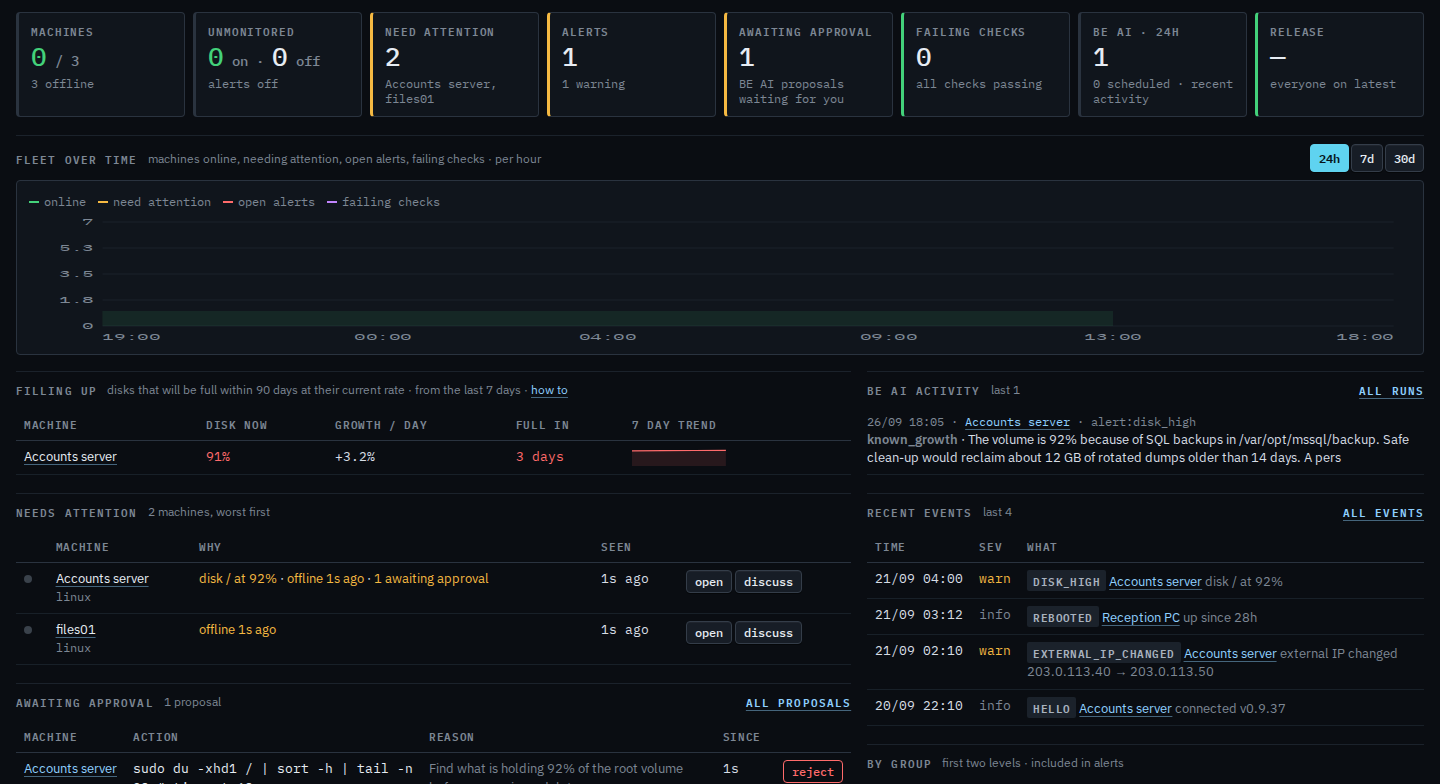
Open Dashboard. The strip still reads Acme, 3 machines, Example Co. The header is sam@acme.example · sub-company user. Notes and the company switcher are not here. The tiles are those three machines: 0 online of 3, 3 offline, unmonitored 0 with alerts off, 2 needing attention (Accounts server and files01), 1 warning alert, 1 proposal waiting, no failing checks. BE AI · 24h is 1, and 0 of those are scheduled. Release is a dash, everyone on latest. There is no BE AI this month block and no link to Usage. Filling up lists Accounts server at 91%, growing 3.2% a day, full in 3 days. Needs attention names disk / at 92% on Accounts server, that it is offline, and one command waiting, then files01 offline. Awaiting approval is the shell command that lists the largest folders on /, with reject and no approve · run. BE AI activity is that finished disk investigation, result known_growth. Recent events, newest first, are the disk warning, the reboot on Reception PC, the address change on Accounts server, and the hello. By group is role › DC (Accounts server) and site › Melbourne (all three). Release adoption shows 0.9.37 on 3 machines, and latest is a dash. This shot does not press a tile.
The same computers as a list are See the computers you were given. The open alert is See alerts on your machines. The waiting command is A proposal you cannot run. The chart your provider sees for the whole company is Read the dashboard.