Change what a customer can do.
My company › sub-companies › manage. The four ticks sit under the groups. Company admin.
Open manage on a login that can view
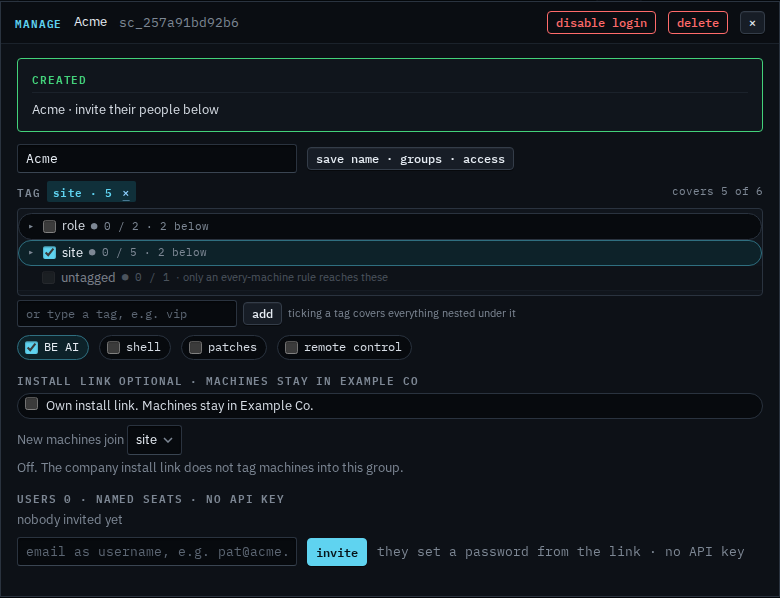
Open My company › sub-companies and create the login the same way as Let a customer manage their computers. Manage on one that already exists opens this same dialog. The green created line is only there because it was just created. BE AI is ticked. Shell, patches and remote control are clear. The corner says covers 5 of 6. That count includes Lab host. The login leaves the hypervisor out, so Acme opens four machines. Save name · groups · access has not been pressed.
Tick shell, then save
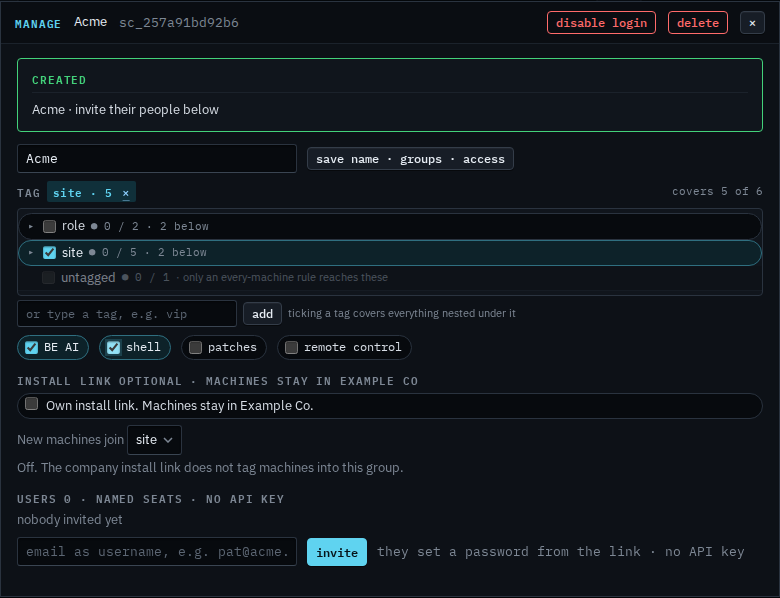
Tick shell. Patches and remote control stay clear until you tick those too. Clearing BE AI stops them asking. Press save name · groups · access and the next thing they do uses the new ticks. A shell they start still needs the machine's own allow shell. This shot stops before save, so Acme can still only view and ask BE AI. The ✕ drops the tick.
Ticking these on a login you have not created yet is Let a customer open a shell, Let a customer approve patches, and Let a customer take the screen. Clearing BE AI so they can view without asking is Stop a customer asking BE AI. Creating the login is Let a customer manage their computers.