Limit a report to servers.
Every live report has the same who box. Type sits under it. Server, workstation, laptop, network device, hypervisor, printer, or other. Several ticked means any of those.
Tick server on the morning brief
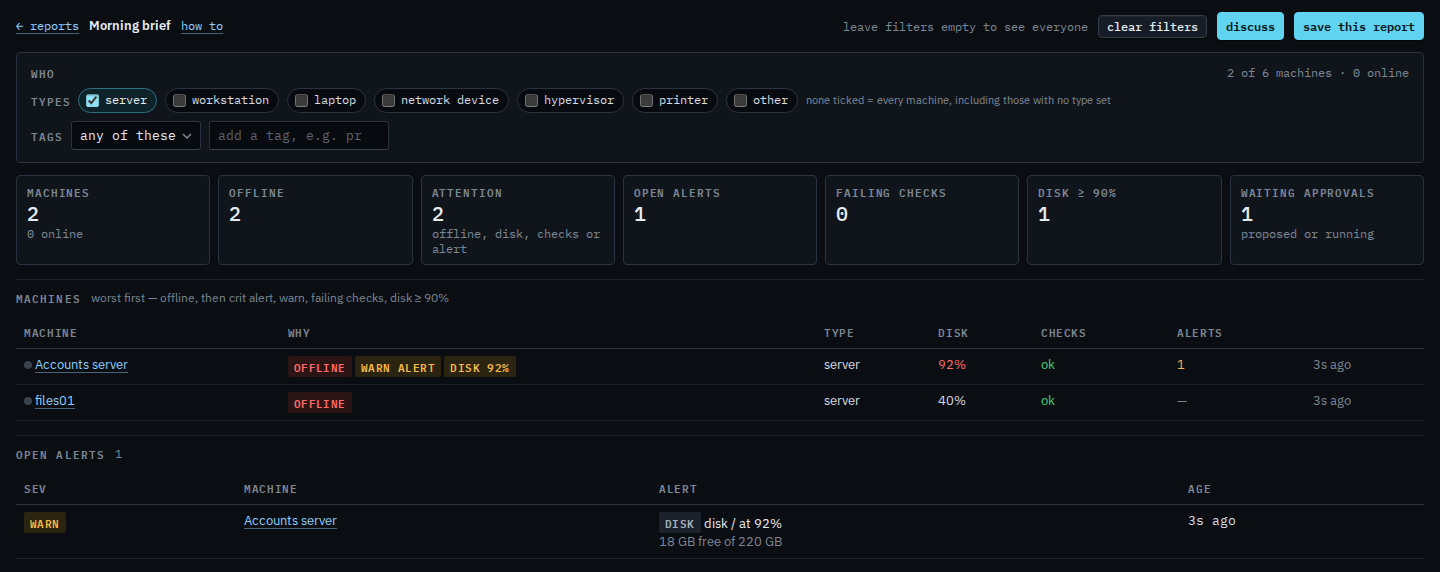
Open Morning brief. Under who, tick server. The line says 2 of 6 machines. Accounts server and files01 stay. Reception PC, Branch router, Lab host and Spare laptop drop out. Accounts server is still the one that needs a look: disk at 92% and an open disk alert. files01 is offline and otherwise fine. Clear filters appears once a type is ticked. Press it to see all six again. None ticked still means every machine, including one with no type set.
Clear filters puts every type back. Laptops are Limit a report to laptops. Workstations are Limit a report to workstations. A network device is Limit a report to network devices. A hypervisor is Limit a report to hypervisors. A site or any other tag is Limit a report to one site. The same ticks are on the alert journal, the patch window, approvals aging, and shell and proxy. Saving them is Save a report you will open again. Asking BE AI about the narrower set is Ask BE AI about the machines in a report. An alert rule limited the same way is Limit an alert rule to servers. The type on the machine is Name a machine and put it in a group.