Find a device on the LAN.
Network › network, on the device table. The box is empty by default, so every remembered device is listed.
Start with the box empty
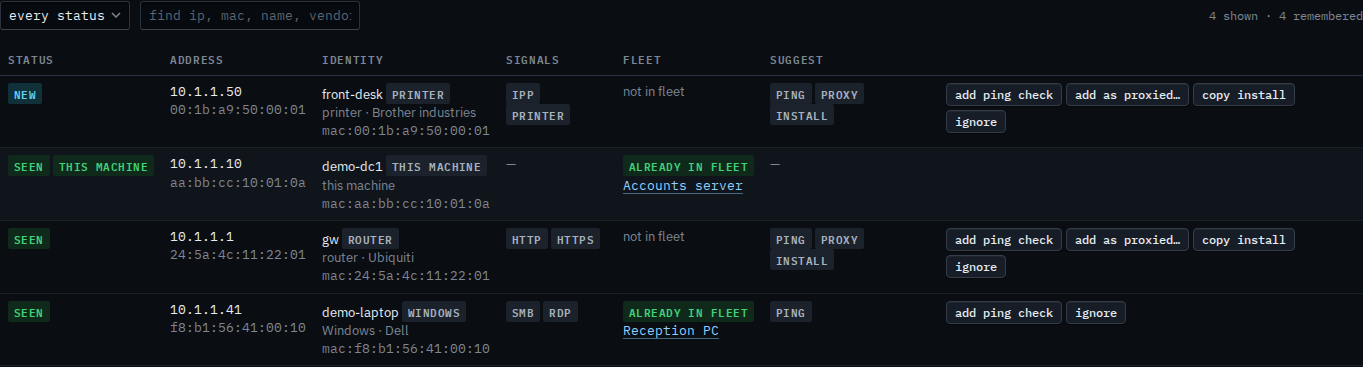
Open Accounts server, then network › network. The find box under the tiles is empty. Four devices are remembered: the gateway, this machine, Reception PC, and front-desk. The box matches an IP, a MAC, a hostname, a vendor, and the fleet name on the row. Press enter to apply it. The status menu beside it is a separate filter — Show only new devices on the LAN.
Type a word from the name, then enter
Type front and press enter. front-desk stays, because that word is in the hostname. The gateway, this machine, and Reception PC drop out. The count says 1 shown · 4 remembered. Clear the box and press enter and the other three return. An address such as 10.1.1.1, a MAC, or a vendor works the same way. A word that matches nothing says 0 shown, and the snapshot still holds the four.

The whole snapshot is Read devices found on the LAN. New only is Show only new devices on the LAN. A ping check from a suggested row is Add a ping check for a device on the LAN. Leaving a row out of the suggestions is Ignore a device on the LAN.