Narrow the machines a customer can see.
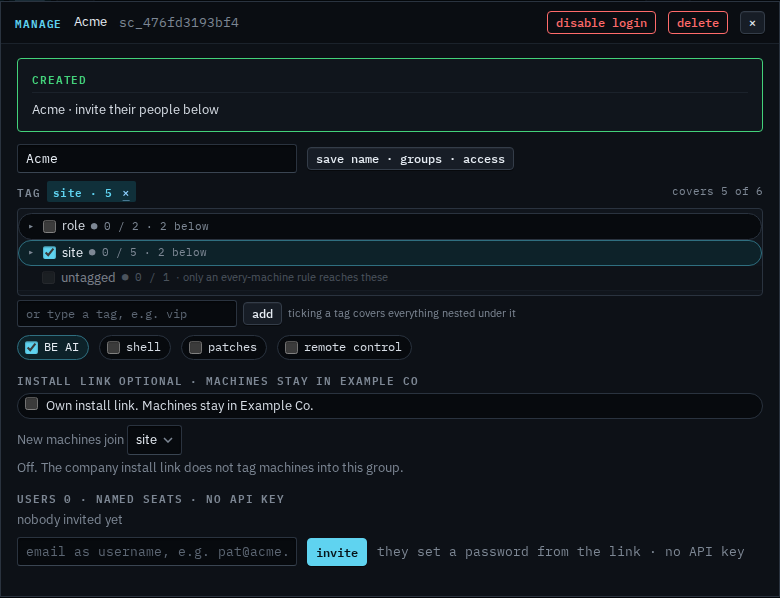
My company › sub-companies › manage. The tag list is the same groups as the fleet. Ticking a parent covers everything under it.
The login still has site
Open My company › sub-companies and open manage. This one was just created with site, so the green created line is there. On a customer that already exists, manage opens the same form without that line. Site is ticked. The corner says covers 5 of 6. That count includes Lab host. The login leaves the hypervisor out, so Acme opens four machines: Accounts server, Reception PC, files01 and Branch router. Spare laptop has no tag, so it stays out. Save name · groups · access has not been pressed.
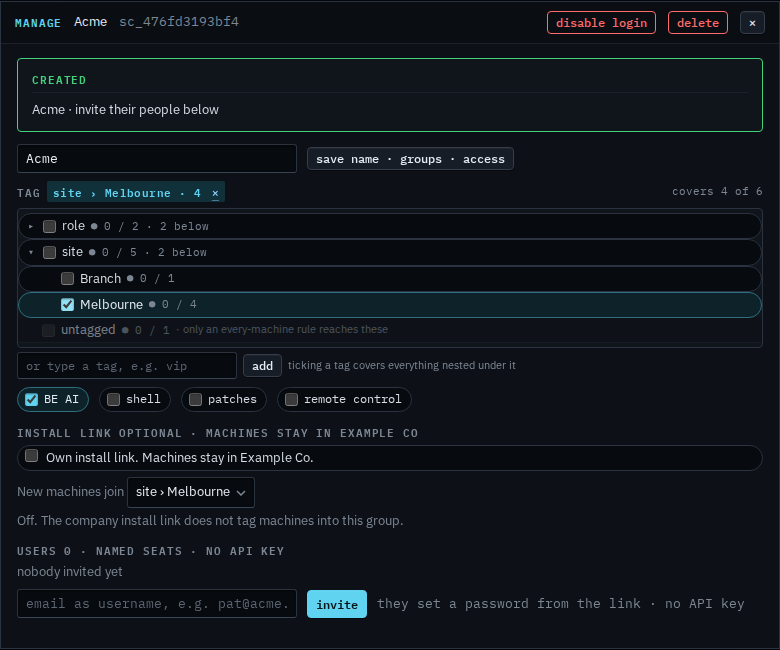
Tick Melbourne only
Clear site, open it, and tick Melbourne. Branch drops out. The corner says covers 4 of 6. Lab host is still in that corner count, and still out of the login, so Acme would open three: Accounts server, Reception PC and files01. Press save name · groups · access when that is the set you want. This shot stops before that, so the login is still on site. The ✕ drops the unsaved change.
The name on the same dialog is Rename a customer login. Creating the login is Let a customer manage their computers. The same tag list on an alert rule is Limit an alert rule to one site. A machine with no group yet is See a machine that is not in a group.