Schedule only the updates you ticked.
Patches › updates. Tick the rows, then schedule selected. The jobs form opens with those updates already chosen.
Open the updates that are still awaiting
The filter is awaiting review. Google Chrome on Reception PC is the row. The September cumulative update is already approved, so it is not in this list. Schedule selected stays off until a row is ticked. See updates from one source is the menu on this same bar.

Tick the row
Tick Google Chrome. The bar says 1 selected, and schedule selected switches on. Approve and decline are on the same bar. This shot stops before any of them. Chrome is still awaiting.

The job is for that row
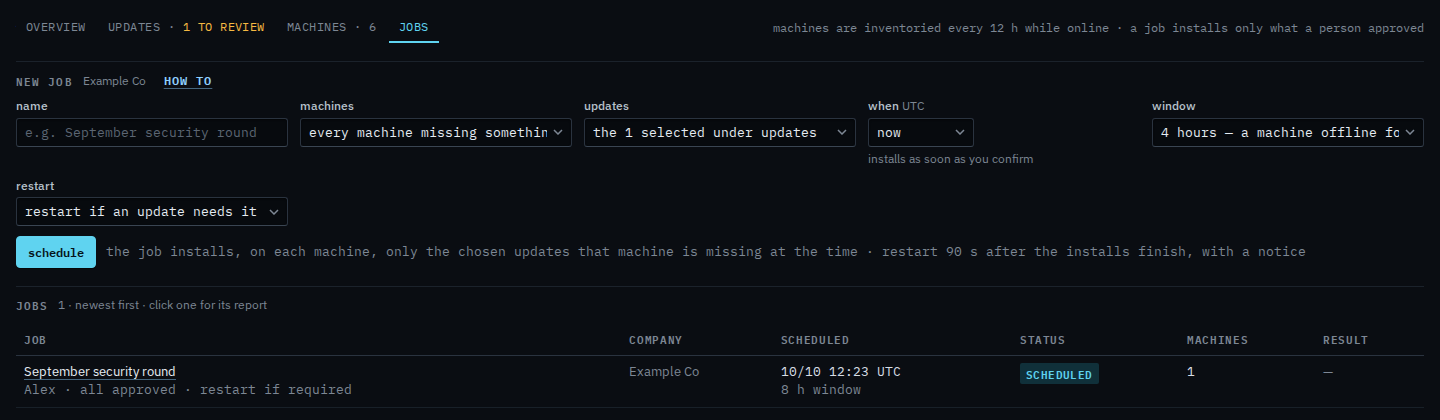
Press schedule selected. Patches › jobs opens. Updates says the 1 selected under updates. That is Google Chrome, which is still awaiting review. A job from this choice installs those rows on each machine that is missing them, even though nobody has approved them yet. Switch the menu to everything approved when you want the usual path: only the September cumulative update. Name the round, pick the machines, the window and the restart, then schedule. This shot stops before that. September security round is already in the jobs list. This form does not start it.
The jobs form itself — name, window, restart — is Schedule a patch install. Approving first is Review and approve missing updates. One machine's approved rows are Install the approved updates on this machine.