Change when the nightly pass runs.
My company, under scheduled pass. Company admin. The pass stays on its saved time until that button is pressed.
Open the scheduled pass
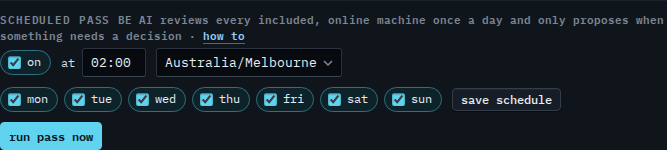
Open My company. Scheduled pass is on the company card. It is on, at 02:00 Australia/Melbourne, every day, until you change it and press save schedule. Run pass now does not wait for that clock. Starting it by hand is Run the nightly BE AI pass now.
Set a later time and weekdays only
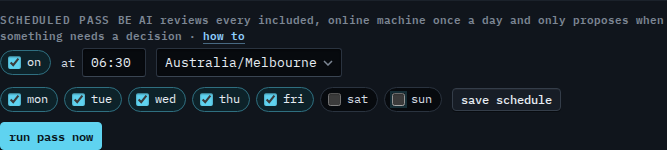
Type 06:30 in the time box and clear sat and sun. The form now says weekdays at 06:30. That is not saved yet. Save schedule writes the clock, the timezone, and the ticked days. This shot stops before that button, so the pass still runs at 02:00 every day. Press save schedule when the new time should stick.
Starting the review before its time is Run the nightly BE AI pass now. The timezone is Run the nightly pass in another timezone. Clearing On for the whole company is Turn off the nightly pass. The rest of the card is Company notes, schedule and remote control. Leaving one machine off the pass is Skip the nightly pass on one machine.