Let a customer manage their computers.
My company › sub-companies. You name the login, tick the groups, and invite each person by email. The invitation says you invited them to manage that name through BE Hub, with secure access to those computers.
Open My company › sub-companies
Company admins. The tab lists each login, the groups it covers, how many machines and people it reaches, and whether BE AI, shell, patches or remote control is on.

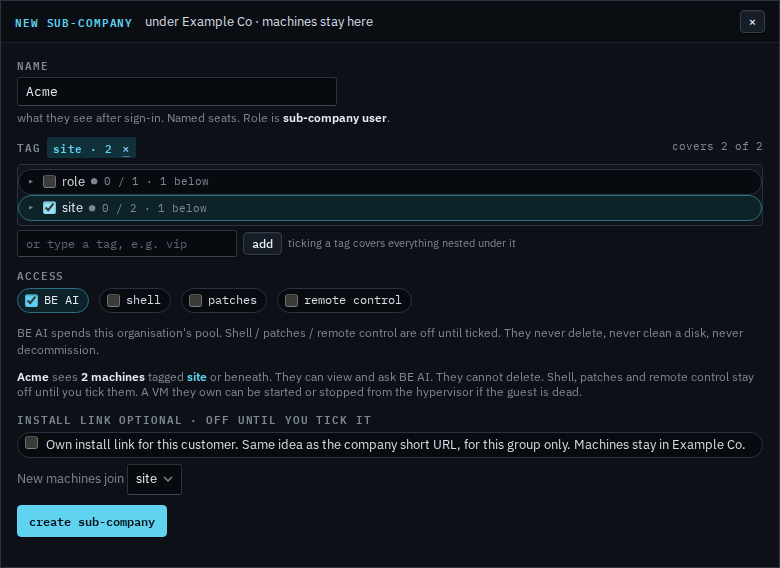
Name it and tick the groups they should see
The name is what they see after sign-in, and the name in the invitation. Tick a group. Everything nested under it is included — here, site covers both Melbourne machines. BE AI is already on. Shell, patches and remote control stay off until you tick them. Own install link stays off unless they should enrol machines themselves — that is its own how-to. Create stays disabled until there is a name and a group.
Invite them by email
Press create, type their work email, and press invite. The message says Example Co invited them to manage Acme through BE Hub, and that BE Hub gives them secure access to Acme's computers: remote access, system health and other management tools. The set-password page says the same. The link works for 7 days, once. In the console their role reads sub-company user. Each person is a named seat. They can view those machines and ask BE AI. Delete, disk clean, decommission, the file explorer and the scripts library stay with you.
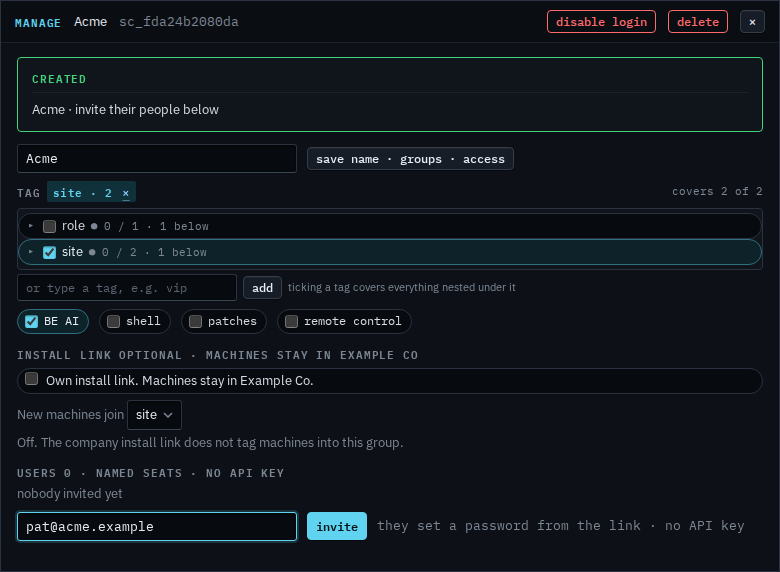
BE AI is on and spends this organisation's pool. Clearing it so they can view without asking is Stop a customer asking BE AI. Shell, patches and remote control stay off until you tick them. Shell is Let a customer open a shell. Patches are Let a customer approve patches. Remote control is Let a customer take the screen. Changing which groups they see later is Narrow the machines a customer can see. The name on that same dialog is Rename a customer login. Changing shell, patches or remote control after it exists is Change what a customer can do. Turning off one of their people is Disable one person on a customer login. Turning the whole login off is Disable a customer's login. Removing it is Remove a customer login. They have no API key. What they see after they sign in is See the computers you were given. An install link is off until you turn it on for that sub-company. A VM they own can be powered only after a technician ties that guest to its hypervisor.