Turn off a customer's install link.
My company › sub-companies › manage. The link is optional. Off is the line under the checkbox after you save.
Untick own install link
Open My company › sub-companies and create the customer with Own install link on, the same way as Give a customer their own install link. The manage dialog opens on the new customer — the green created line is only there because it was just created. On one that already exists, manage opens this same form without that line. Clear Own install link. The share box stays until you save. Save name · groups · access is the button that writes it. This shot is before that press. Machines already installed from the URL keep reporting, because the enrollment token stays.
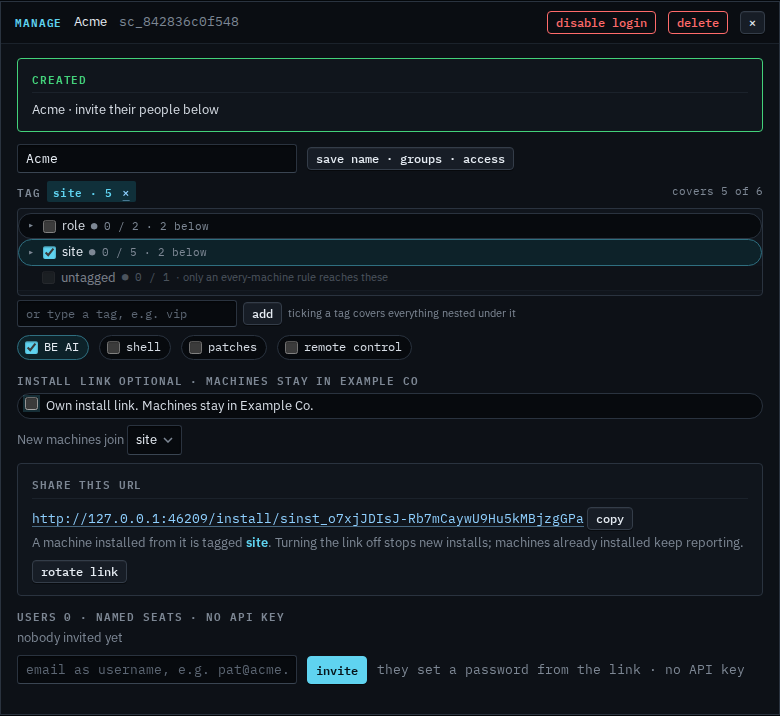
Save, and the link is off
Press save name · groups · access. The share box goes. The line under the checkbox reads Off. The company install link does not tag machines into this group. New installs from the old URL stop. Acme's people no longer see that URL on the strip. Their sign-in stays. Tick the box and save again to turn a new URL on — the old one does not come back.
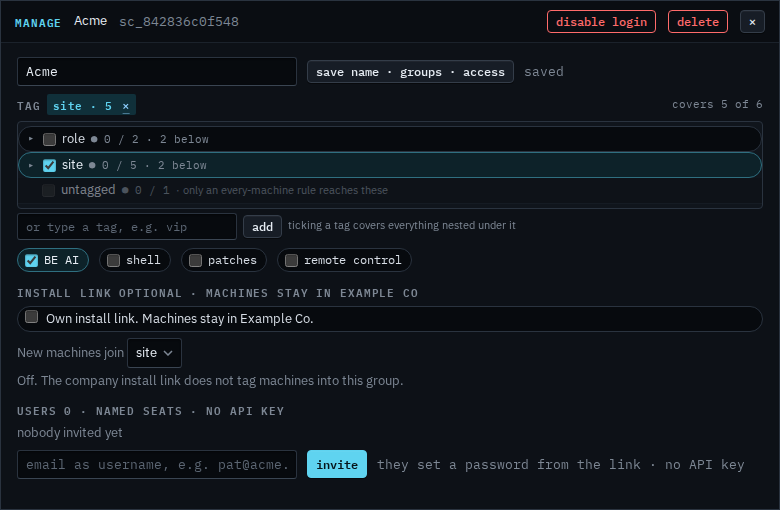
Turning it on, and copying the URL, is Give a customer their own install link. Replacing that URL and leaving the link on is Rotate a customer's install link. A machine that should join this company and keep its identity uses Re-point a machine that is already installed. Rotating the company link is Rotate the install link.