Read approvals beside the machine.
The button is on the machine header. The rail is this machine only. The Proposals page is the same queue for the whole company.
Inbox is on the machine
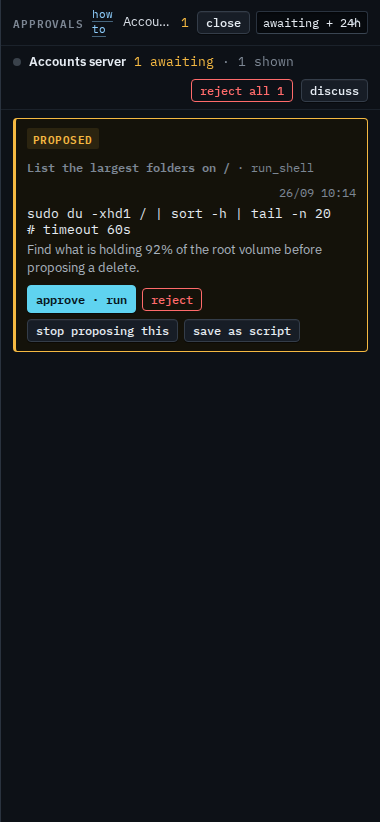
Open the machine. Inbox is on the header, next to discuss. The count is how many proposals are still waiting on this machine. Accounts server has one. The rail is closed in this shot.

Open the rail
Press inbox. The rail is the waiting work for Accounts server. The card is the command BE AI wants run, in the words it used. Approve · run asks you to confirm, then runs it. Reject drops this copy and runs nothing. Stop proposing this is there because the disk alert behind the proposal is still open: accepting that condition rejects this copy so the same cleanup is not filed again tomorrow. Ask BE AI continues the thread. Save as script keeps a shell command in the library. Reject all 1 rejects every waiting proposal on this machine, and it also asks you to confirm. Close hides the rail. The menu is awaiting + 24h: waiting and running cards, plus anything decided today. Awaiting only drops the recent decisions. Everything keeps older failed and rejected cards, and a failed card has retry.
Approve and reject, including the two-step confirm, are Approve or reject a proposal. The menu that hides decided cards is Show only waiting approvals. Keeping the command for next time is Save a proposal as a script. Stop proposing this, when the disk or the check is known and fine, is Accept a condition that is known and fine. What a sub-company user sees on the same rail, with reject and no approve, is Read the inbox on your machine.