Choose how the fleet is drawn.
The picker is on the fleet list, next to the search box. Auto is list while the company is small, and exceptions once there are more than a hundred machines.
Cards
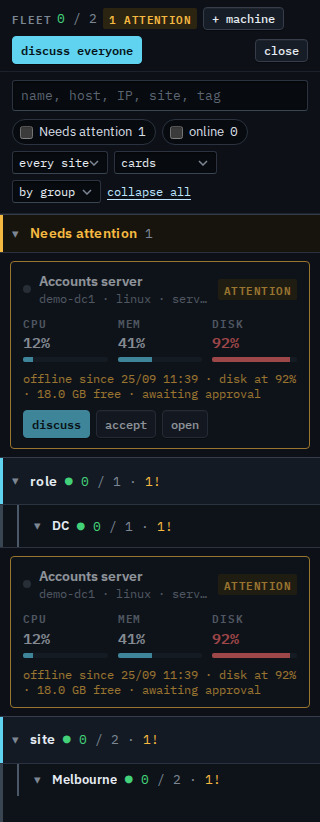
Open Fleet and set the view to cards. Each machine is a card with CPU, memory and disk. Amber is needs attention (disk, a failing check, offline, or an open alert). Expand a group to see the cards under it. Find a machine and open it is the same list as rows.
Exceptions
Set the view to exceptions. Needs attention is cards, with discuss, accept and open. Everything else is one line per site or group: how many are online, the fullest disk, the busiest memory. Expand a line for the rows. A machine with an open critical alert sits in its own section. Find a critical machine is that section on the list view.
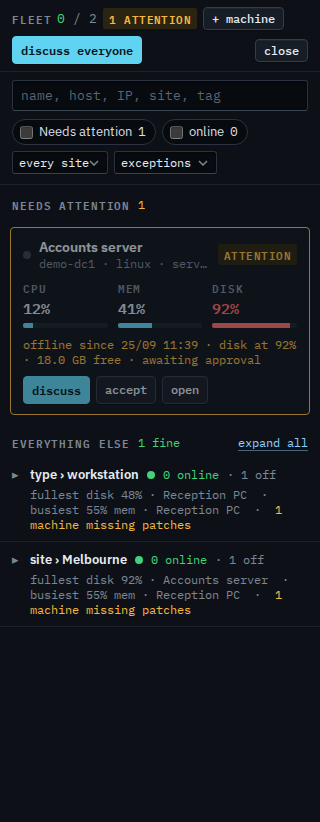
Exceptions is the view for a large fleet: machines that need attention as cards, and one line per group for everything that is fine. Expand a line to see those machines as the ordinary list. A single list, without sites, is Show the fleet as one list. On the list, the group headings can be light, bold or blocks — Change how groups are drawn. Opening every site at once is Open or close every fleet group. What a sub-company user sees is Choose cards or exceptions.