Show only machines that need attention.
The tick sits with the other fleet filters. It is the same set as the Needs attention section, without the machines that are fine underneath.
Open Fleet with every machine
Open Fleet and expand the groups. Needs attention is clear. That section lists Accounts server, whose disk is at 92%, and Branch router. Spare laptop sits under Onboarding because it has no group. Reception PC is under Melbourne and is fine, so it stays in the company list.
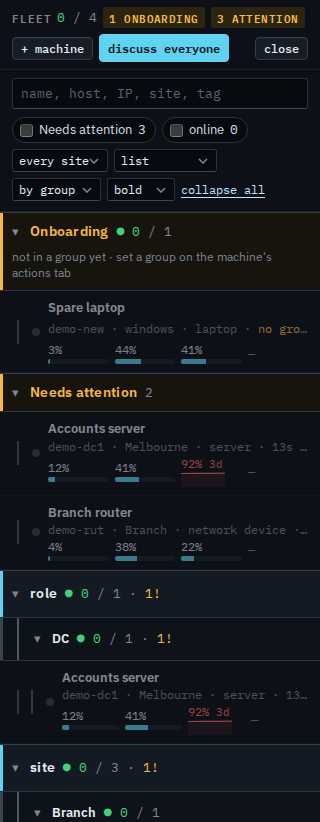
Tick Needs attention
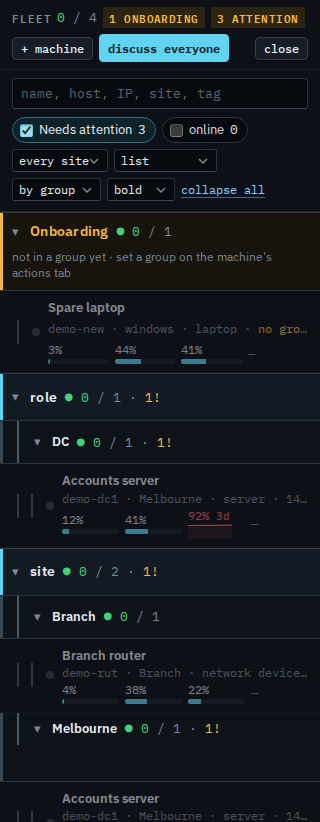
Tick Needs attention. The pinned section goes away. The groups keep Spare laptop under Onboarding, Accounts server under Melbourne, and Branch router under Branch. Reception PC drops out: it is fine, and an overnight shutdown is already left out of offline alerts. Clear the tick to put the whole company back. The choice lasts for this visit to the console.
The pinned Needs attention section, with the groups still underneath, is the list before this tick. Machines that are up right now are Show only machines that are online. One site is Focus the fleet on one site. A flat list is Show the fleet as one list. Opening one machine is Find a machine and open it. The same tick for a sub-company user is Show only your machines that need attention.