Disable a customer's login.
My company › sub-companies › manage. Disable login is the whole customer. One person in Settings › users is a different row.
Open manage on the customer
Open My company › sub-companies and create the login the same way as Let a customer manage their computers. Manage on a customer that already exists opens this same dialog. The green created line is only there because it was just created. The status is active. Disable login sits in the header, next to delete. It has not been pressed.
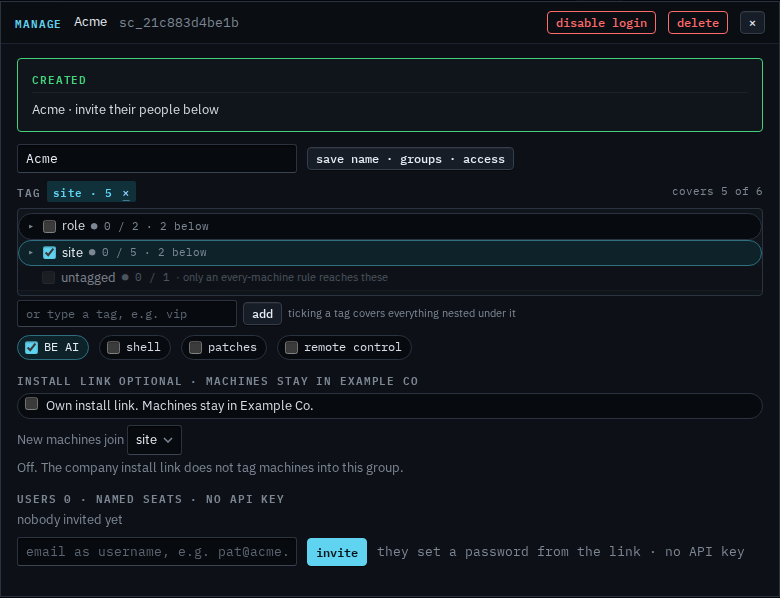
Press once to arm it
The label turns into confirm: disable their login. Press it again and their people are signed out. The next sign-in is refused until you press enable login on this same dialog. Machines in the groups stay enrolled in Example Co and keep reporting. This shot stops before the second press, so Acme can still sign in.
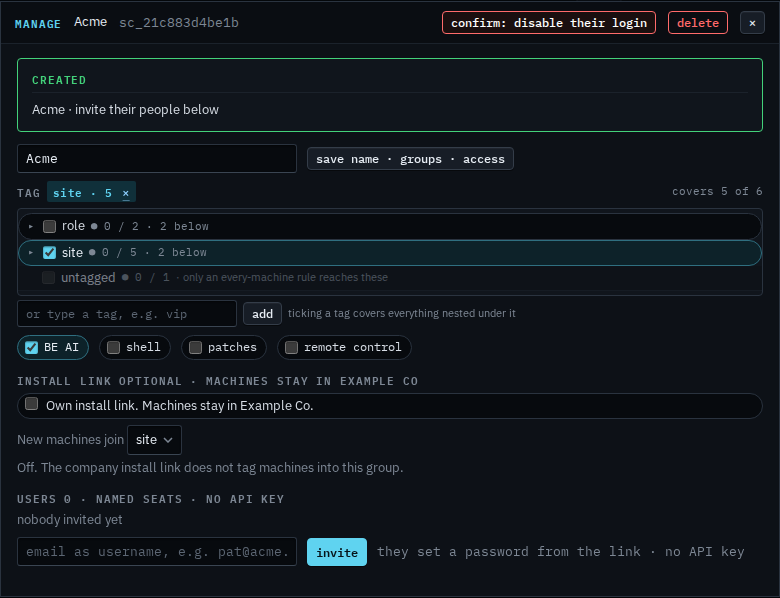
The second press, and the button that brings the login back, is Turn a customer's login back on. One of their people, with the login left on, is Disable one person on a customer login. One person in your company is Disable a person's sign-in. Removing the login is Remove a customer login. Creating it is Let a customer manage their computers.