Focus the fleet on one site.
The site picker sits with the other fleet filters. It is the same focus as the link on a group row. Onboarding stays pinned.
Open Fleet with every site
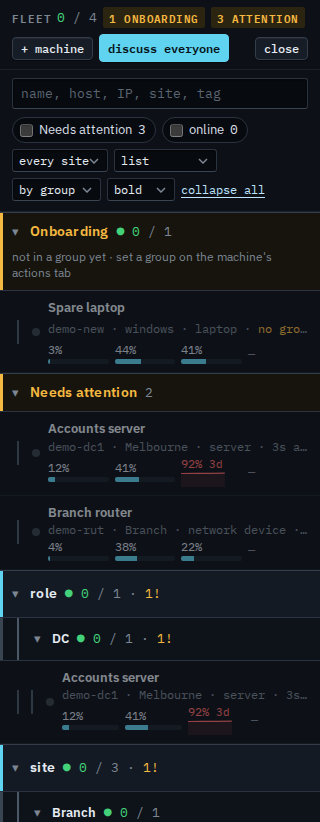
Open Fleet. The site picker says every site. Expand all so the groups are open. Melbourne holds Accounts server and Reception PC. Branch holds the router. Onboarding stays at the top (Spare laptop has no group). Needs attention stays under that: Accounts server (disk at 92%) and Branch router.
Pick a site
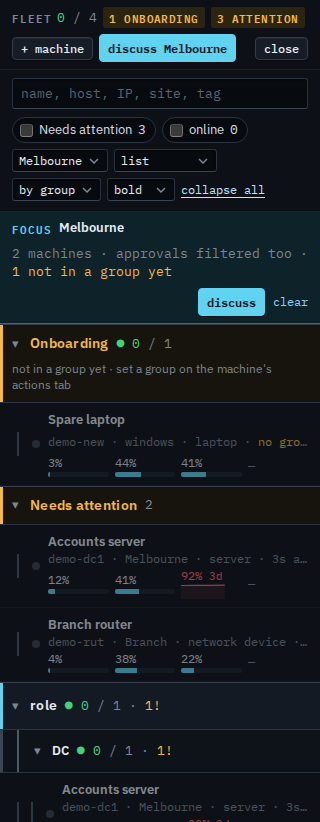
Set the site picker to site / Melbourne. A focus bar names Melbourne, counts 2 machines, and says approvals are filtered too. The site group is Melbourne. Accounts server also shows under role, because that machine is a DC at Melbourne. Spare laptop stays in Onboarding, and the bar says 1 is not in a group yet. Needs attention still lists Branch router: that strip is every machine that needs a look. Press clear, or set the picker back to every site, to see the whole company again. The choice is remembered in this browser.
Drawing the list as groups or one flat list is Show the fleet as one list. Hiding machines that are fine is Show only machines that need attention. Asking BE AI about the machines in view is Ask BE AI about a group. Putting a machine in a site is Name a machine and put it in a group. What a sub-company user sees is Focus your list on one site.