Read missing updates on your machine.
Patches in the nav is every machine you were given. This tab is one computer: what it reported, and whether your provider has already approved it.
Open Work › patches
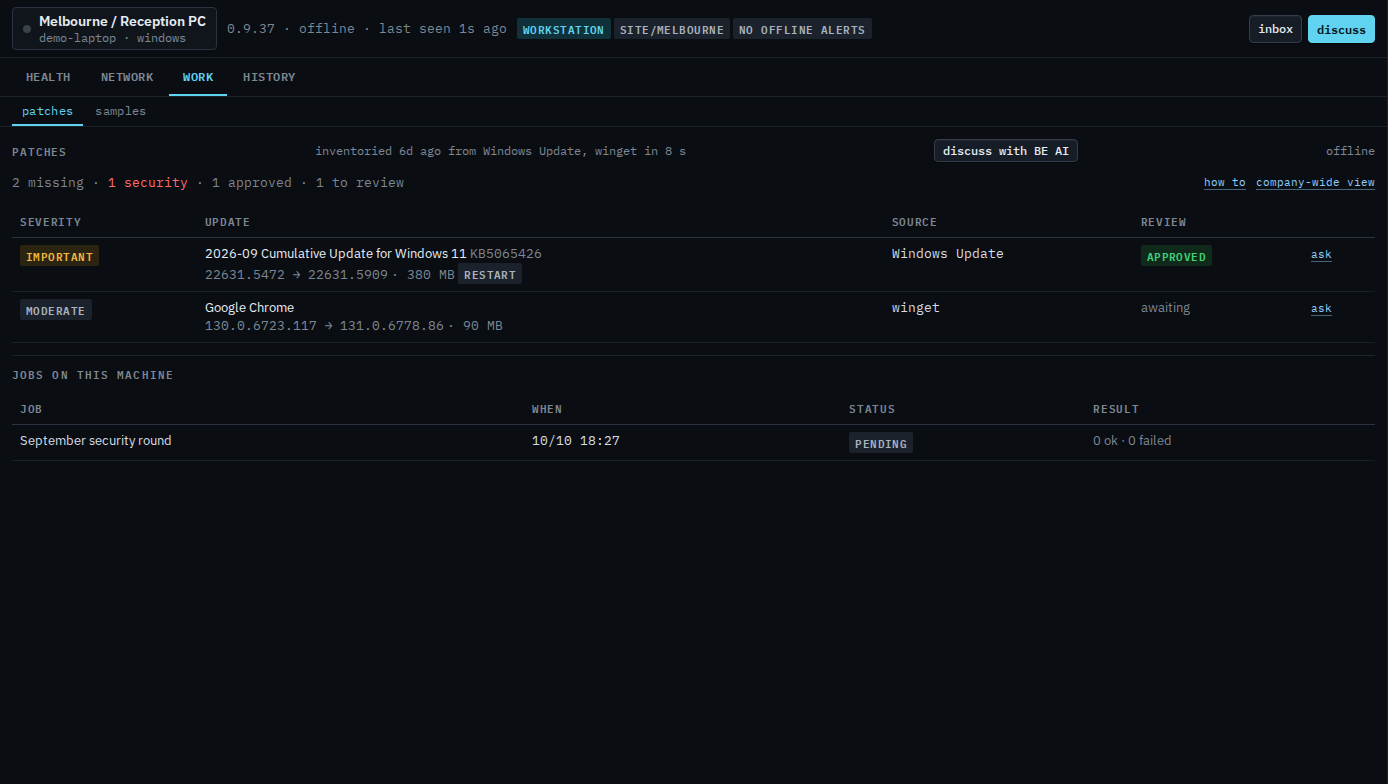
Open Reception PC, then work › patches. The bar says inventoried 6d ago from Windows Update, winget in 8 s, and offline, so there is no scan now. Discuss with BE AI is there. There is no install approved and no approve security here. The line reads 2 missing, 1 security, 1 approved, 1 to review. The cumulative update is important, approved, and needs a restart. Google Chrome is moderate and still awaiting. Each row has ask and no approve or decline. Jobs on this machine names September security round as text, status pending, result 0 ok · 0 failed. It is not a link, because jobs stay with Example Co. Company-wide view opens Patches for your machines. This shot does not press ask or discuss.
The company page for the same numbers is Inventory updates on your machines. Asking about one row is Ask about one update on your machine. Your provider turns the tab on in Let a customer open Patches. What they see, including approve and install, is See missing updates on one machine.