Show only new devices on the LAN.
Network › network, on the device table. Every status is the default.
Open the device table
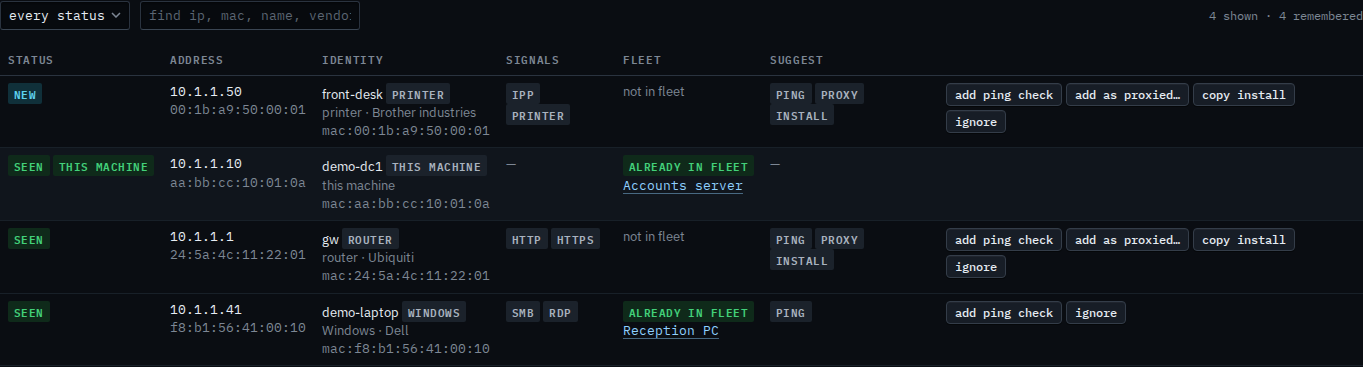
Open Accounts server, then network › network. Under the address tiles, the status menu says every status. Four devices are remembered: the gateway, this machine, Reception PC, and front-desk. front-desk is new. The other three are seen. The count says 4 shown · 4 remembered.
Keep new devices
Set the status menu to new. The gateway, this machine, and Reception PC drop out, because they are seen. front-desk stays. The count says 1 shown · 4 remembered. Set the menu back to every status and the other three return. Nothing was removed from the snapshot, and nothing was enrolled.

The whole snapshot is Read devices found on the LAN. A word in the find box is Find a device on the LAN. A ping check from a suggested row is Add a ping check for a device on the LAN. Leaving a row out of the suggestions is Ignore a device on the LAN. Weekly is Turn on the weekly LAN scan. The hub never enrols from this list.