Read devices found on the LAN.
Network › network, under the address tiles. The table is what this machine could see on its own subnet.
Open the LAN snapshot
Open the machine, then network › network. The address tiles are the machine itself. Under them, the snapshot is the subnet it can see. On Accounts server that is 10.1.1.0/24. This machine and Reception PC are already in the fleet. The gateway is the router. A printer that is not enrolled shows as new, with add ping check and copy install — those are suggestions, not actions already taken. See how a machine is connected is the tiles above. Watch a device that cannot run the agent is how a firewall on this list becomes a machine of its own.
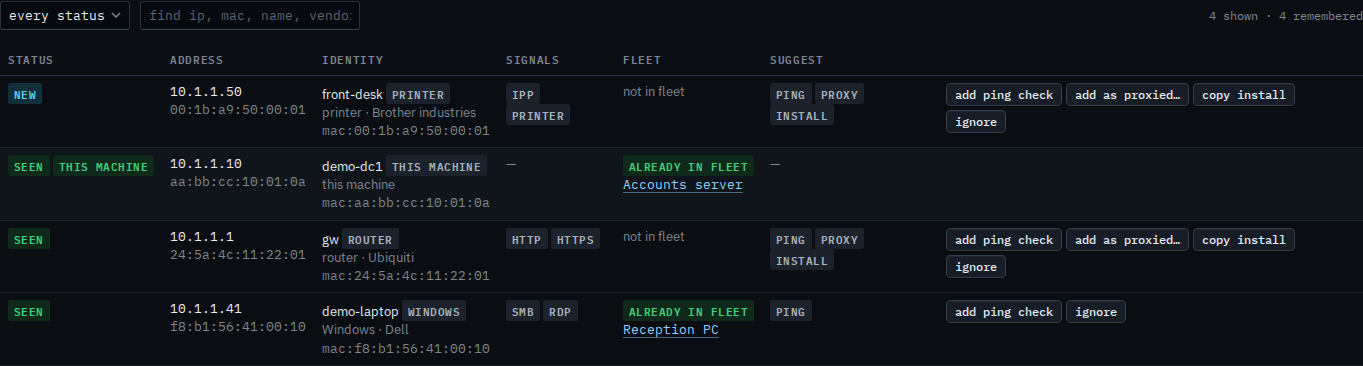
New only is Show only new devices on the LAN. A word in the find box is Find a device on the LAN. Scan now needs the machine online and asks you to confirm. Weekly is Sundays at 02:00 Melbourne unless you change it — Turn on the weekly LAN scan. Adding a ping check from a suggested row is Add a ping check for a device on the LAN. Copying the Linux install line is Copy the install line for a device on the LAN. Leaving a row out of the suggestions is Ignore a device on the LAN. The hub never enrols from this list.