Read the inbox on your machine.
The button is on the machine header. The rail is this machine only. The Proposals page is the same queue for every computer you were given.
Inbox is on the machine
Open Accounts server. Inbox · 1 is on the header, next to discuss. The count is how many proposals are still waiting on this machine. The rail is closed in this shot. There is no terminal, no control, and no watch.

Open the rail
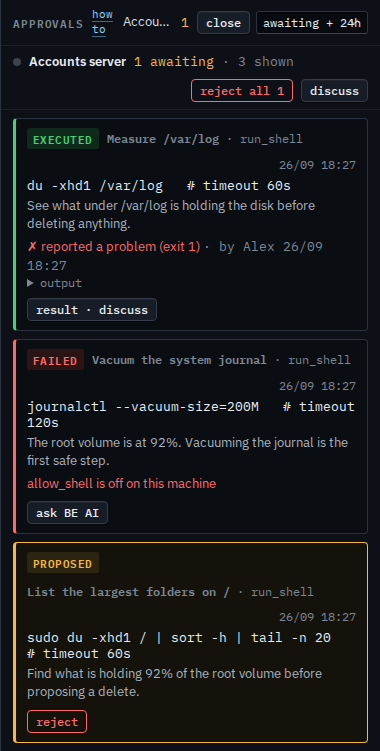
Press inbox. The rail heading is approvals, for Accounts server, menu awaiting + 24h, so today's decisions stay. The count is 1. The group line says 1 awaiting · 3 shown, with reject all 1 and discuss. Three cards, newest first. Measure /var/log already ran and reported a problem (exit 1): result · discuss. Vacuum the system journal already failed because allow_shell is off on this machine: ask BE AI, and no retry. List the largest folders on / is still waiting, at the bottom: reject, and no approve · run, no ask BE AI on that card, no stop proposing this, and no save as script. Reject all 1 would reject that waiting copy and also asks you to confirm. This shot does not press reject.
Hiding the cards that already ran is Show only what is still waiting. The same waiting command on the Proposals page is A proposal you cannot run. Asking in the conversation is Ask BE AI about your machine. What your provider sees, including approve and save as script, is Read approvals beside the machine.