Choose cards or exceptions for your machines.
The view picker sits next to search. Auto is list while you have fewer than a hundred machines.
Set the view to cards
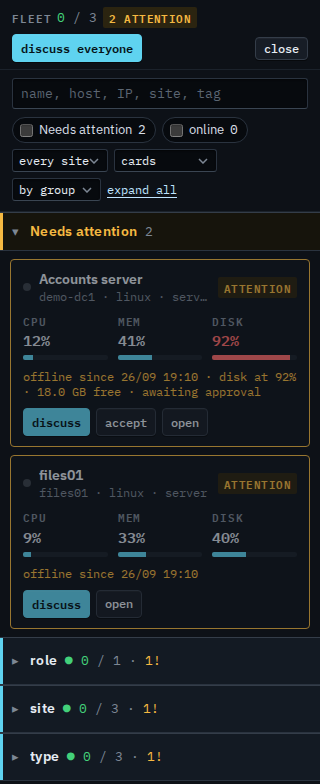
Open Fleet and set the view to cards. Group by stays by group. Press expand all so the groups open. Needs attention is two cards, and these cards have buttons. Accounts server shows cpu 12%, memory 41%, and disk 92%. The line under it is offline, disk at 92% with 18.0 GB free, and awaiting approval. Its buttons are discuss, accept, and open. files01 shows cpu 9%, memory 33%, and disk 40%, and it is offline. Its buttons are discuss and open. Accept is on Accounts server because the disk alert is a condition a technician can mark known. This login cannot record that. The choice stays with your provider. This shot does not press the buttons. Under the groups the same machines appear again as cards, and those cards have no buttons: role › DC is Accounts server, site › Melbourne is all three, type › server is Accounts server and files01, and type › workstation is Reception PC. Reception PC says ok, with cpu 6%, memory 55%, and disk 48%. There is no + machine. Lab host, Branch router, and Spare laptop are not here.
Set the view to exceptions
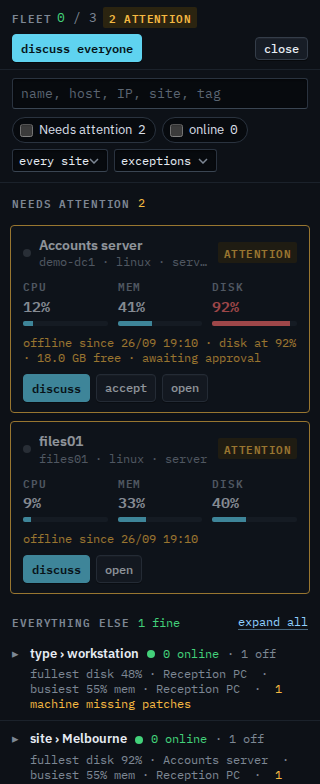
Set the view to exceptions. The grouping picker and the toolbar expand all are hidden. Search, the online tick, and the site picker stay. Needs attention is the same two cards. Accounts server has discuss, accept, and open. files01 has discuss and open. This shot does not press them. Everything else says 1 fine, and that section has its own expand all. Two lines stay closed. type › workstation says 0 online · 1 off, fullest disk 48% · Reception PC, busiest 55% mem · Reception PC, and 1 machine missing patches. site › Melbourne says 0 online · 1 off, fullest disk 92% · Accounts server, busiest 55% mem · Reception PC, and 1 machine missing patches. The Melbourne disk names Accounts server because that line counts the whole site, including the machines already in needs attention. Reception PC is the fine machine. The lines stay closed, so its row stays tucked away. Set the view back to list for the ordinary rows.
The ordinary rows are See the computers you were given. One list, without sites, is Show your machines as one list. One site is Focus your list on one site. What your provider sees, including machines outside your groups, is Choose how the fleet is drawn.