Read the morning brief.
Reports › Morning brief is the list you open before the first call. It reads the fleet. It does not change a machine.
Open Reports and pick Morning brief
It sits under Operational, next to approvals aging, the alert journal and the patch window. The tiles are machines, online, offline, attention, open alerts, failing checks, disk at 90% or more, and approvals still waiting. The table underneath is the machines, worst first. In this demo nothing is connected, so both machines read offline. Accounts server is the one that needs a look: disk at 92% and an open disk alert. Reception PC is off and excluded from offline alerts, so it is not in the attention count. One approval is waiting on Accounts server. Work an open alert is that disk warning. Approve or reject a proposal is the waiting action. Read the dashboard is the same numbers without the table.
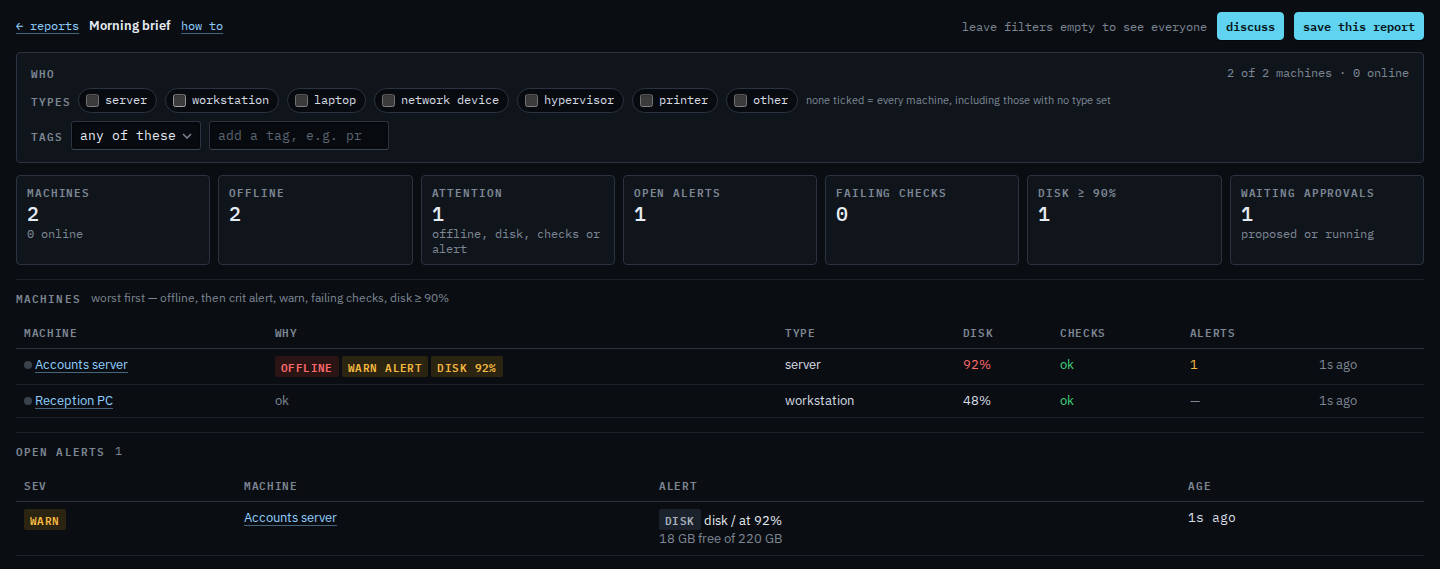
Save this report keeps the filters, not a frozen list of hostnames. Save a report you will open again is that step. Ticking server is Limit a report to servers. Ticking laptop is Limit a report to laptops. Ticking workstation is Limit a report to workstations. A network device is Limit a report to network devices. A hypervisor is Limit a report to hypervisors. A printer is Limit a report to printers. Type other is Limit a report to machines of type other. A site tag is Limit a report to one site. Discuss on this bar is Ask BE AI about the machines in a report. The same filters are on the alert journal, the patch window and approvals aging. A machine with offline alerts turned off is not treated as a problem just because it is off.