A proposal you cannot run.
Proposals is the queue for your machines. Approve · run appears only for an action your login is allowed to run.
Open Proposals
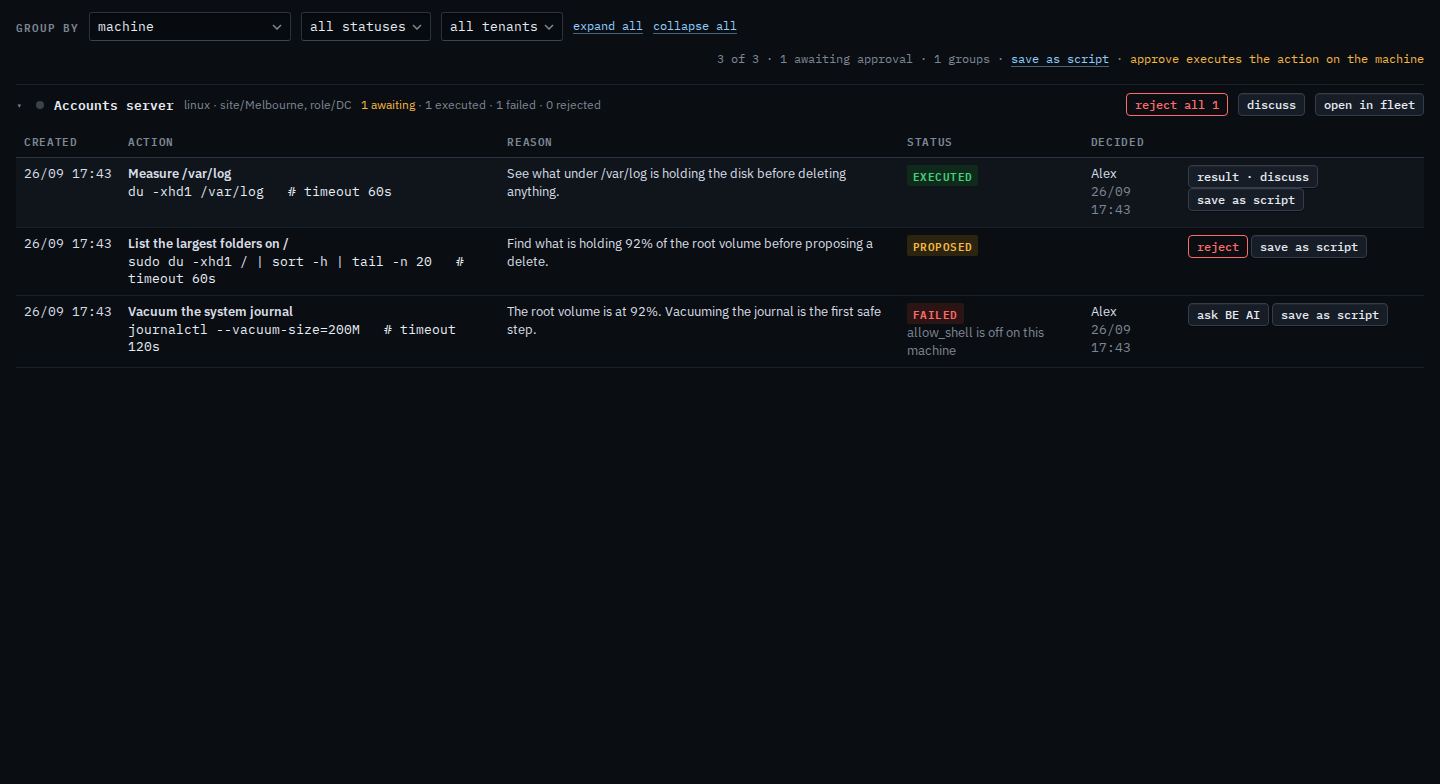
Open Proposals. Accounts server has three rows. The one still waiting is List the largest folders on /, a shell command. This login has patches and BE AI, and shell is off, so that row has reject and ask BE AI, and no approve · run. Reject drops this copy and runs nothing. Vacuum the system journal already failed, because allow shell is off on the machine, and there is no retry. Measure /var/log already ran. Reject all 1 rejects the one that is still waiting, and it asks you to confirm. There is no stop proposing this. Save as script is on each shell row. Scripts is not in this nav; the library stays with Example Co. This shot stops before reject.
The machine that proposal is about is in See the computers you were given. The same queue beside the machine is Read the inbox on your machine. Confirming a reject of every waiting copy is Reject every waiting proposal on your machines. Keeping only the one that failed is Show only the proposals that failed on your machines. Your provider turns shell on in Let a customer open a shell. What approve does, on a login that has it, is Approve or reject a proposal.