Ignore a device on the LAN.
Network › network, under suggested monitors. Ignore is on a row the hub has not enrolled. Press it once. Stop ignoring puts the row back.
Find the row under suggested monitors
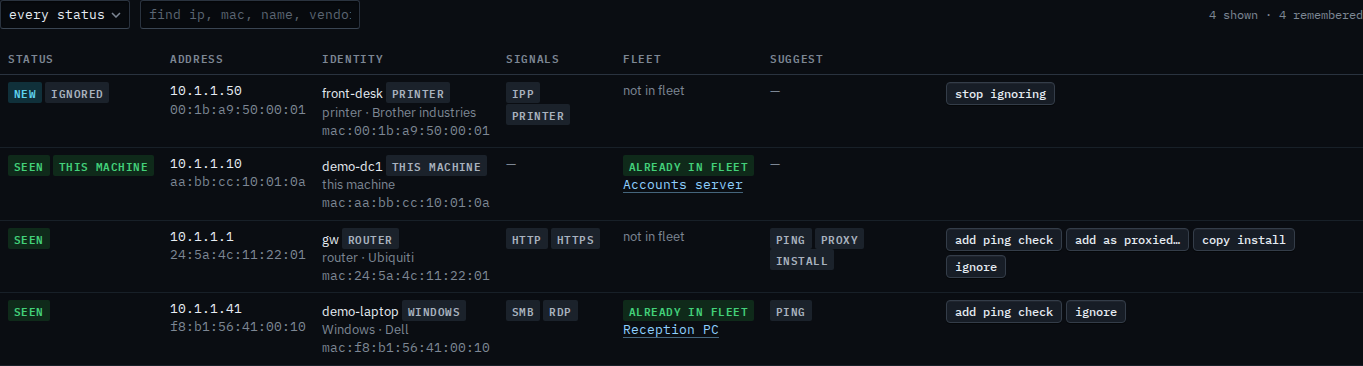
Open the machine, then network › network. Under the device table, suggested monitors lists addresses that are not enrolled. front-desk is a printer on 10.1.1.50, marked new. Ignore is on that row, next to add ping check and copy install. Those other buttons have not been pressed. Read devices found on the LAN is the table above.

Press ignore
Press ignore. The row stays in the table with an ignored chip, and the button becomes stop ignoring. It leaves suggested monitors, so the next person is not asked to ping it or copy an install line. The device is still on the subnet. Press stop ignoring when it should count again. Nothing here enrols a machine.
Reading the table is Read devices found on the LAN. Finding one row by name is Find a device on the LAN. Putting the row back is Stop ignoring a device on the LAN. A ping check on the same row is Add a ping check for a device on the LAN. The weekly pass is Turn on the weekly LAN scan. A firewall you do want as a machine is Watch a device that cannot run the agent.